RISK MANAGEMENT
How to Set Stop Losses for Swing Trading
Choose the price that invalidates the setup, check whether recent volatility makes that level practical, and only then calculate the number of shares that fits your risk rules.
BY TRADEREGIMEN EDITORIAL / PUBLISHED · 8 MIN READ
You decide you want 100 shares. Then you move the stop closer until those 100 shares fit the dollar loss you are willing to take. The arithmetic may balance, but the plan is backwards: the desired size has chosen the failure point.
For an initial swing-trade stop, start with the setup itself. Write down what must remain true, identify the price evidence that would make that statement false, and specify whether an intraday trade or a closing price counts. Account risk determines how many shares you can take. It does not tell you where the chart becomes invalid.
Your stop is not the amount you are willing to lose. It is the price that proves the setup wrong.
Separate three different decisions
- Setup invalidation: the price evidence that means the original trade idea no longer qualifies under your method.
- Planning stop: the price you enter into the risk calculation. This is the reference used to estimate risk per share.
- Broker order: the execution instruction you place and manage at the broker. Its eventual fill can differ from the planning stop.
These prices may be related, but they are not interchangeable. A close-based invalidation rule, for example, is not implemented by an intraday stop order in exactly the same way. Decide which rule you actually mean before calculating shares.
A five-step stop-to-size method
1. State the setup premise in one sentence
A useful premise names the condition you expect to hold. “This stock should go up” cannot produce a defensible invalidation level. A premise tied to observable structure can.
- A breakout plan may depend on price holding above a defined part of the prior base.
- A pullback plan may depend on a recent swing low or chosen support reference continuing to hold.
- A trend plan may use a daily or weekly close relative to a moving average, if that close rule was defined in advance.
These are examples, not universal stop rules. Different setups can use different evidence. The important part is that another trader could read your sentence and tell whether the condition still holds. The same principle applies when a scanned setup moves from active to triggered or invalidated.
2. Turn the premise into an exact invalidation rule
Record both the price and the trigger basis. “Invalid below $47.50” remains ambiguous until you add “on an intraday trade,” “on a daily close,” or another explicit condition.
Avoid placing the stop directly on an obvious level merely because the number is easy to see. Decide whether the method allows a buffer, how that buffer is calculated, and what would make the chosen level stale before entry.
3. Use volatility as a sanity check, not as the thesis
Average True Range, or ATR, describes recent price variability and includes gaps in its true-range calculation. A simple comparison is:
Volatility distance = absolute entry-to-stop distance divided by ATR
That result adds context. It does not certify the stop. A level inside ordinary price movement may be vulnerable to noise, while a very wide level may create a position too small to justify. ATR is also historical and non-directional; it cannot tell you whether the next move will be up or down.
If the only structurally coherent stop is wider than expected, examine the wider level and let the share count fall. If the resulting trade no longer fits the plan, skipping it is cleaner than pulling the stop inward until the desired size works.
4. Calculate shares from the chosen stop
Risk per share = absolute difference between planned entry and planned stop
For a long position, a protective stop belongs below the planned entry. For a short position, it belongs above the entry. Then calculate the risk budget from the account rule:
Raw shares = floor(effective dollar-risk budget / risk per share)
Round down to a whole share. Then compare the result with the shares allowed by the maximum position value, remaining portfolio risk, available position slots, and any saved Market Context sizing rule. The final size is the smallest permitted result. It can be zero.
For a deeper treatment of that constraint stack, see regime-adjusted position sizing.
5. Treat the broker order as a separate execution problem
FINRA explains that a standard stop order becomes a market order after the stop price is reached. The execution price is not guaranteed and can be materially worse in a fast or gapping market. A stop-limit order adds a limit price, but then execution itself is not guaranteed.
Review the order types, trigger rules, extended-hours treatment, and other details offered by your broker. The planned loss remains an estimate until an exit is actually filled.
Worked example: stop first, size second
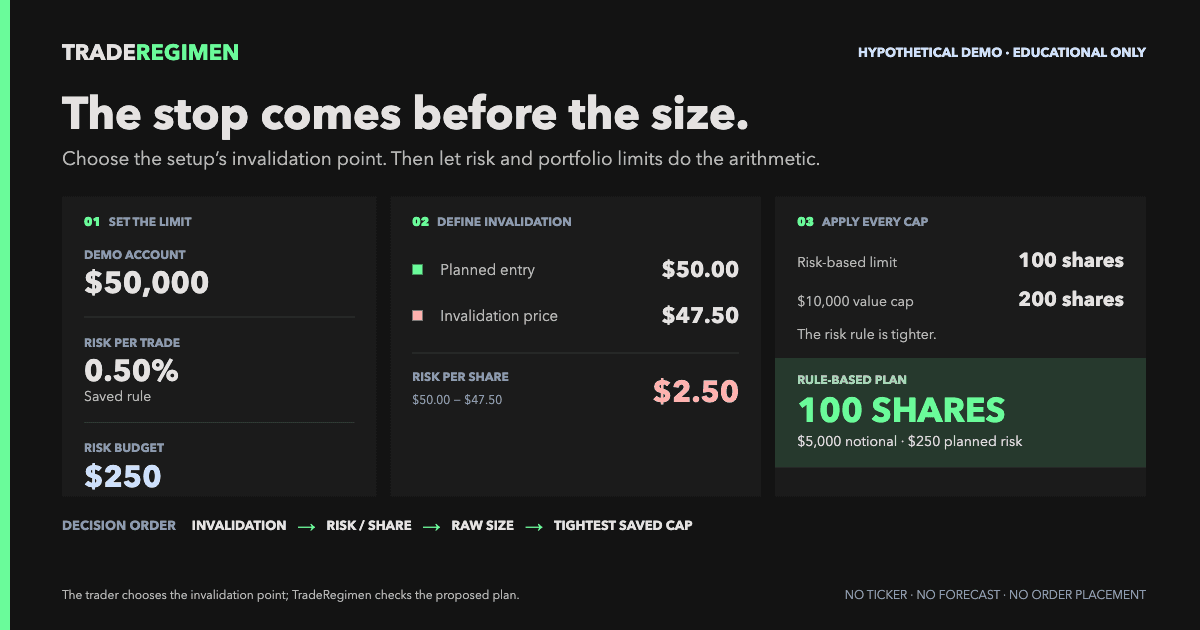
The following uses a fictional symbol named DEMO. It is an illustrative calculation, not a security recommendation. Suppose the setup review has already established that the long trade no longer qualifies below $47.50.
| Input | Value | Meaning |
|---|---|---|
| Planned long entry | $50.00 | Hypothetical entry used for planning |
| User-chosen stop | $47.50 | Price tied to the fictional setup invalidation |
| 14-day ATR | $1.25 | Recent-volatility context only |
| Account equity | $50,000 | Fictional account value |
| Risk per trade | 0.5% | $250, defined as 1R in this example |
- Risk per share is $50.00 minus $47.50, or $2.50.
- The stop is 5% below entry and 2.0 ATR away. Those are descriptions of the chosen level, not the reason for choosing it.
- The account's 0.5% rule permits $250 of planned risk.
- The portfolio currently uses 2R of a 4R maximum, leaving $500. The $250 per-trade rule is therefore the tighter risk limit.
- $250 divided by $2.50 permits 100 whole shares.
- A $10,000 maximum position value would permit 200 shares at $50, so the notional rule is not binding.
- The saved Market Context rule is met and one of six position slots is already used, so neither condition reduces the result.
The final plan is 100 shares, $250 of planned risk, 0.5% of equity, 1R, and $5,000 of notional value. Portfolio risk would move from 2R to 3R. The limiting message is: “Share count is capped by the Constitution risk-per-trade rule.”
The $250 figure assumes an exit at $47.50. A gap or a worse market-order fill would produce a larger realized loss. The example also excludes fees, commissions, and taxes. Position sizing controls the plan; it cannot guarantee the execution price.
Common ways the calculation fails
- Starting with the desired shares. This makes the stop a balancing number instead of a statement about the setup.
- Using one percentage for every chart. The same percentage can represent ordinary movement in one stock and a major structural break in another.
- Letting ATR choose the stop automatically. ATR describes movement. It does not know which price invalidates the trade idea.
- Mixing an initial stop with a trailing rule. The first invalidation level and the later method for protecting an open gain answer different questions.
- Leaving the trigger basis undefined. An intraday stop order can exit before a close-based rule has been evaluated.
- Assuming the stop price is the fill price. Gaps, thin liquidity, and fast markets can make actual losses larger.
A copyable stop-to-size worksheet
Complete this before choosing the share count. Keep the filled version with the trade review so a later outcome cannot rewrite the original reasoning.
STOP-TO-SIZE WORKSHEET
SETUP
Direction:
Planned entry:
The setup remains valid while:
The setup is invalid if:
Invalidation price:
Trigger basis: intraday trade / daily close / weekly close / other
Why this price represents failure:

VOLATILITY AND EVENT CHECK
ATR period and value:
Entry-to-stop distance:
Distance divided by ATR:
Known earnings, news, gap, or liquidity risk:
Does the stop still come from structure rather than desired size?

RISK RULES
Account equity:
Saved risk per trade:
Base dollar-risk budget:
Remaining portfolio risk:
Maximum position value:
Available position slots:
Saved Market Context rule and current state:

CALCULATION
Risk per share = |entry - stop|:
Effective dollar-risk budget:
Shares allowed by risk = floor(budget / risk per share):
Effective maximum position value:
Shares allowed by notional = floor(maximum value / entry):
Final whole shares:
Planned dollar risk:
Planned notional value:
Projected portfolio R:

EXECUTION
Broker order type:
Can the fill differ from the stop price? Yes
Order entered and managed separately at the broker:
Plan/data checked as of:
How TradeRegimen uses the method
In TradeRegimen's manual position workflow, the user supplies the direction, planned entry, and planned stop. TradeRegimen does not choose the invalidation level or certify it against ATR.
The sizing ticket uses those inputs with the user's saved risk per trade, remaining portfolio R, maximum position value, available position slots, and Market Context sizing rule. It shows whole shares, risk per share, planned dollar risk, risk percentage, notional value, projected portfolio R, and the rule that limited the result.
The manual workflow also checks Market Context, daily loss, weekly loss, correlation, sizing, and exposure against the saved Constitution. A conflict remains a decision for the user. TradeRegimen does not place, cancel, manage, or block an order at the broker.
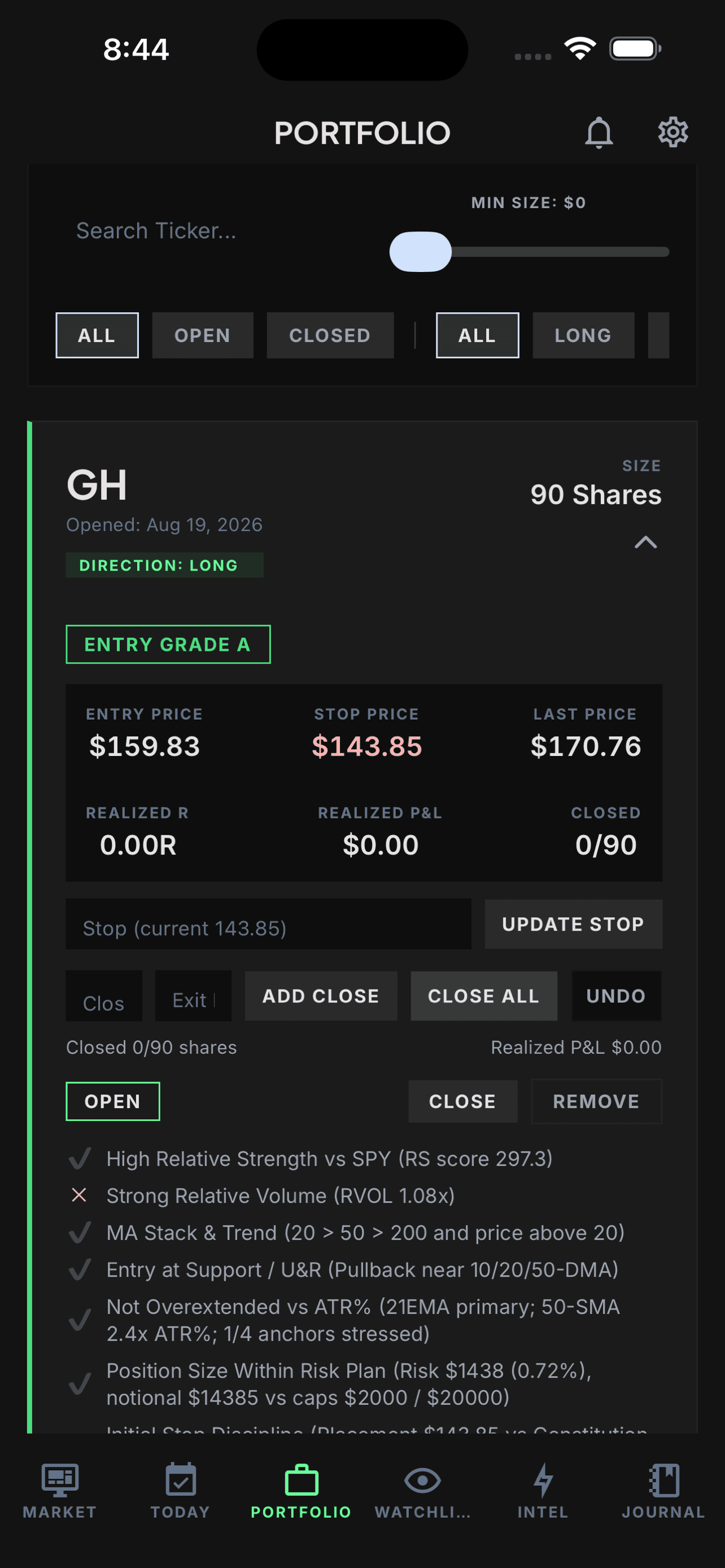
A precise calculation can still begin with a poor stop. The product makes the inputs, rules, result, and exception visible; the trader still owns the setup definition and execution decision.
Use the worksheet on one planned trade
Take one trade you have not entered. Write the invalidation sentence without looking at the desired share count. Add the trigger basis, calculate the volatility distance, and then let the risk rules produce the size.
If you need to define the account rules first, use the Trading Constitution guide. To see where stop and size planning fit in the full workflow, open the TradeRegimen Start Here path.
Sources and review context
- Fidelity, Average True Range (ATR). Defines ATR as a volatility measure that incorporates gaps and discusses ATR-based stop context. Accessed September 14, 2026.
- FINRA, Stop Orders: Factors to Consider During Volatile Markets, published March 26, 2025. Explains stop-order triggers, market-order conversion, execution-price risk, and stop-limit tradeoffs. Accessed September 14, 2026.
REVIEW NOTE
The DEMO calculation is fictional and was checked against the current TradeRegimen manual-entry sizing workflow on September 14, 2026. Educational information only, not individualized investment advice. Stops do not eliminate market, gap, liquidity, execution, or data risk. TradeRegimen does not place or block brokerage orders. Read the full disclaimer.
Run your trading like a system.
Build your Constitution, check a manual position plan when you log it, and review rule states while recorded positions are open.
Get Started